Saturday, 16 April 2016

Upgrade Information for Revit 2017

Revit 2017 is looking good to me. There is some welcomed functionality and features that is enough to convince me to upgrade fairly soon and that's not including the further improved performance for Revit 2017. 

However, with each new version comes a section in the Help Menu 'Upgrade Information for Revit 20xx'. I feel it is a section of the Help Menu that is often overlooked prior to upgrading. For 2015, there were 3 fairly harmless items in this list and last year there was only 1 relating to filters. 
The list for Revit 2017 warrants your attention, in my opinion, more so than previous years.

For Revit 2017 the items noted by Autodesk that may be affected are: 
 > Text
 > Toposurface
 > Keynotes
 > Railings
 > Structural Connections
 > Render Settings
 > Family Categories for MEP fabrication
 > Revit.ini changes. 

So I would recommend completing the necessary testing before upgrading projects and I certainly wouldn't be upgrading anything that has a deadline nearing, but hopefully that goes without saying. 

Tuesday, 12 April 2016

Revit 2017

*UPDATE* - 15/04/2016
Steve Stafford has done a great job outlining many of the new updates for 2017 at Revit OpEd. So head on over to get the latest on what I mentioned previously and lots, lots more. Thanks Steve!! 


The release of Revit 2017 appears to have commenced... The Autodesk Help menu online is giving us some information here... 


After going through the content contained at the Help menu link above, here is some of what I have seen or read about so far: (To be confirmed when something more official from Autodesk is released!)
  • Depth Cueing - Control how elements that are farther away from the viewer display in section & elevation views.
  • Text Enhancements - A new 'Edit text' contextual ribbon includes paragraphing & list improvements, indents & convert upper/lower case controls. (See below for more on text notes)
  • Calculating Values for Schedules & Annotation Tags - You can include calculated parameters in tags.
  • Combine Parameters in a Schedule - Combine two or more parameters to display in a single cell of a schedule. eg: Combine the Height & Width parameters to display [Height x Width] instead of two separate columns. 
  • You can Add Subcategories to Reference Planes - It was demonstrated in families.
  • Hosted Railings - You can now sketch a path and host railings on the face floors, slabs, slab edge, walls or roofs.
  • RFA to FormIt Converter - Do you use FormIt? You can now convert your existing Revit library. 
  • Stairs has now been included as a category for In-place families.
  • Autodesk Raytracer is the only rendering engine now available.   
  • Dynamo is included in the Revit 2017 installation. It will appear on the Manage ribbon.  
  • Manage links - Additional options will be available when using worksharing. Users can unload links locally only. 
  • View Templates for Schedules and Assemblies. 

More on Text Notes. This has been extracted from the Help Menu:

The text editor has been enhanced to add text notes directly in canvas. During editing, text displays in the correct font and style. Other text editor improvements include the following:

- For quick access, new contextual text editing tools are available in the ribbon.
- All text is visible while editing.
- Text wraps, scales, and scrolls as you expect.
- You can zoom and pan while editing a text note. The zoom scale does not affect text wrapping.
- You can enter unnumbered or non-bulleted text in lists by pressing Shift+Enter. 
- You can specify the text editor to display an opaque background and a border when editing a note. This option allows you to better see the text while typing over complex drawings.


I will update this post as more information is released. 

RTC Australasia 2016

The good news... as of now, we are 29 days, 23 hrs & 41 minutes away from the 12th RTC Australasia 2016 kicking off in the Hunter Valley!! 

The bad news... I can't make this years event. Unfortunately dates just didn't gel well this year so I have had to give it a miss, but I look forward to hearing all the feedback from colleagues and friends who are attending. There looks to be some really interesting talks scheduled, so if you haven't registered yet, it's not too late! 

This year's event is at the Crowne Plaza in the Hunter Valley. The event runs from the 12th - 14th May. 

Having attended the last 2 events, I can say that this is just about the best money you will spend on professional development when it comes to Revit & Building Information Modelling. The last few years has also seen the event evolve by looking at more than just Revit, with a focus on various software and concepts to really improve the way we do things in the industry. 

Photo's from last year's event on the Gold Coast. 

Welcome to RTC Australasia 2015
Speakers & Representatives from a broad range of companies attend.
We are in the information age & Data is a hot topic!
It's not all work! Sea World opened at night just for RTC attendees! 
 You can register here.

Can't make the Australian event? There are plenty more around the world! 


Sunday, 10 April 2016

Parts & Colour Schemes

The 'Parts' tools in Revit are a great asset. Since their introduction, I have read a lot about them in the positive. I find this is mainly due to them being fairly versatile compared to other tools in Revit and it is the main reason I like to use them for interior materials & finishes scheduling. 

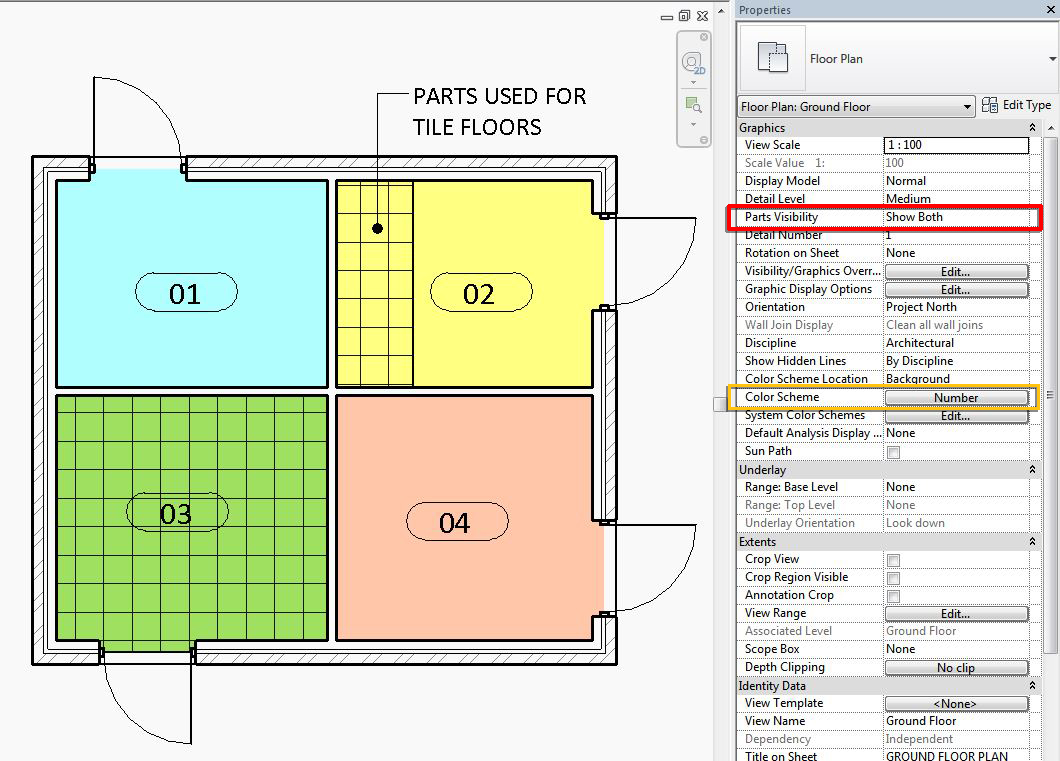
A student of mine recently discovered Colour Schemes won't work on plans showing parts. I am not entirely sure if this is a glitch or not, but there is a very simple fix.
By default, a
ll views are assigned 'Show Original' for the 'Parts Visibility' property. When we create parts, Revit automatically defaults the 'Parts Visibility' property for the view to 'Show Parts' instead. When this is activated, colour schemes won't show in areas where parts are being used. 
As you can see below, the rooms on the right are displaying colour schemes, as this floor has not been edited with parts. The rooms on the left have been edited and the colour scheme won't show.

I mentioned the possibility of a glitch, because when I select the floor on the left, we can actually see the colours from the colour scheme behind the divided parts. 


Regardless, the fix is to change the property for 'Parts Visibility' to 'Show Both'. You will now be able to see the Parts created and the colour scheme used. 

Revit 2016 - R2 Update 4 (Group Rotation Fixed!)

Revit 2016 - Release 2, Update 4 has been released recently. This is a special update because if you read the release notes, you will notice a fix for groups! 

Just last week I posted about groups and getting to know a number of problems related to using groups. Well we can strike one off the list now. Rotating groups was sometimes a problem because face based families would flip on there host if you rotated the group 90°. The wierd thing was, if you rotated 45° twice, it would be fine. 

I did a test this morning by creating a group with a face based family and rotated it. Behaviour was as expected. I then installed Update 4, reopened the project and rotated the group, problem fixed!

Now, if you don't have access to subscription only updates relating to Release 2, don't worry too much, Revit 2017 is just around the corner and this will likely be part of it. 

Thursday, 7 April 2016

Dynamo Course Training

I am the proud owner of a shiny new certificate!

This week I took some time out to complete the new Dynamo course by Ian Siegel over at Lynda.com. The course duration is just over 3 hours, it took me longer as I followed along with the videos, but I can say it was a very good course. It does a good job of introducing you to a broad range of nodes available in Dynamo and what you can achieve in wiring them together. 

The course focuses on the Dynamo plug-in for Revit. You can still participate with Dynamo studio, but there is chapter at the end that focuses specifically on Revit nodes which you won't have access to. 

The course can be found here and I would recommend it if you are starting out with Dynamo. 

Happy learning! 


Monday, 4 April 2016

Duplicating Views with Linework

This is just an echo of a post by Tim Waldock over at the 'Revit Cat' recently, about duplicating views with Linework overrides. 

If you use the linework tool on elevations for example to create your overrides and you want to duplicate the view, 'Duplicate with Detailing', does not retain any of those linework overrides. 

We now know, to duplicate the view and KEEP those overrides, you need to 'Duplicate as Dependent'. Then, right click on that newly created view and select 'Convert to Independent View'.

Nice one.